
PDF converter tool for Windows
PDF to JPG converter is a Windows application that lets you convert a PDF file into different file formats. It features a simple interface that is easy to use and is so fast that you don’t have to wait too long to convert a file. The application supports a range of file formats, including TIF, PNG, PCX, JPG, GIF, and BMP, among others. Although PDF to JPG converter is not a PDF tool for free, it does offers a free trial period.
Top Recommended Alternative
Furthermore, the PDF converter can also instantly convert batch files. This is probably one of the best features available on the app, as it allows you to work on multiple files at once, thereby saving you time. Additionally, you can use the app to edit the images that you create by rotating and combining them. Other applications that let you convert files, and are worth checking out are Free PDF to JPG Converter, JPG to PDF Converter, JPG to PDF Pro Converter.
What can users expect from the PDF to JPG app?
While there are several applications that can edit or convert PDF files, there are very few applications that have a simple interface with time-saving features like batch conversions.
PDF to JPG converter is one such tool that can help you easily convert a PDF file to any popular format, including PNG, JPG, TIF, PCX, TGA, BMP, and more. Additionally, users can expect fast and accurate conversion, thereby saving themselves a lot of editing time. Once converted, you can rotate or combine the image files any way you like. You can also personalize these images by adding a header or footer. Last but not the least, you can use the PDF to JPG converter to convert a few pages instead of the entire file.
What are the features of the PDF to JPG app for Windows?
Once you complete the setup process, you will be able to start using the application instantly. You no longer need to download converted files. Instead, the application instantly saves the file on your desktop directly. Since the PDF to JPG application is available on your computer, you can work on any PDF file without worrying about data security or privacy. Another great feature is that the app doesn’t convert files online, so you can easily work on any document without worrying about safety and security.
Furthermore, you can use the application to convert several files at once or convert just a few pages instead of the whole document. The PDF to JPG converter app supports a command-line interface, which means that if you’re good at programming, you can easily modify the app to your preference.
Is PDF to JPG app free?
Unfortunately, the PDF to JPG converter isn’t available for free. However, the app offers a free trial version to explore its many features and functions before committing to a paid plan. Since the PDF to JPG download is a paid program, you don’t have to worry about advertisements or hidden charges.
What about the interface?
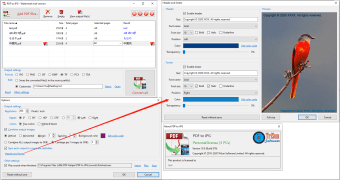
One of the best things about downloading the PDF to JPG application on your Windows computer is that it has a clean and simple interface. To get started, all you have to do is drag the file you wish to convert onto the dashboard, select the output format, and let the PDF image converter do its work. Additionally, you can select the image quality and size when converting a PDF to a JPG.
Should I download the PDF to JPG converter app for Windows?
If you’re looking for a simple and easy-to-use PDF converter, then look no further and download PDF to JPG converter. Not only does the application let you convert PDF files to JPEG format, but it also supports other formats like PNG, GIF, PCX, TIF, BMP, and more. It also provides a batch conversion feature that lets you convert multiple files simultaneously.
Once you convert a PDF file to an image format, you’re able to make several edits without any hassle. You can rotate or merge image files, add header and footer, and do much more. Furthermore, the application is so user-friendly that you can simply drop a PDF file on the dashboard for quick conversion.